Showing posts with label QR Codes. Show all posts

Tuesday, February 17, 2015

Zentangle Watercolor Animals

Update: Check out the Art of Ed's post today about watercolor techniques. We used many of these techniques in our lesson.

What could be better than intense color, rich pattern and funky animal drawings? Well...if you add a QR code that shares a recorded student reflection with who ever scans it, that will top it!


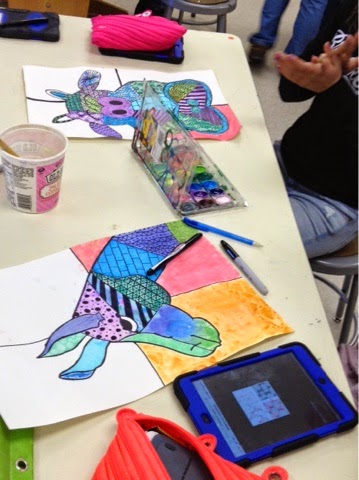


Here is the outline of our most recent work- Zentangle Watercolor Animals (with QR code reflection)

1. Begin with demo of/practicing watercolor techniques
The techniques we focused on were:
  • Dry Brush
  • Wet-in-wet
  • Rubbing Alcohol
  • Salt
  • Scrape
  • Crayon Resist
  • Wash
Great video demos here if you need a refresher on basic watercolor techniques.
 
2. Practice drawing a large scale animal or animal head. Outline in Sharpie- remember to vary the thickness of the lines! 


3. Break up the animal shape with lines to create multiple spaces. Paint various watercolor techniques within the spaces.

4. Draw Zentangle patterns over the dried paint spaces. Discuss why it's important to put contrasting patterns next to each other. 


5. Use Croak.It! app to record a 30 second reflection about art making process. The questions we answered were as follows:

6. Use QR Code Maker app to turn the Croak.It! recording into a scan-ready QR code. Print and post on completed artwork.

Students enjoy all the aspects of this project- especially practicing all the various watercolor techniques. Adding the QR code was a nice way to wrap up the work and reflect in an unconventional way.

Monday, September 26, 2011

QR Codes= Success!

After some trial and error, the codes are working great! There are some issues with our network blocking the link from playing but usually we can just sign ourselves in and hear the recording. 

I must admit, I (Mrs. Hare) was doubting if anyone was going to listen to them. But soon after I finished putting them up, a couple of high school students were scanning the codes with their brand new iPad 2s! How cool! Now...if the middle school could just have one-to-one iPads...:)

Here is a quick rundown of what a QR code is. (We created recordings of an artwork reflection that were then turned into a code.) 


Have you seen these odd looking black and white squares magazines, on signs, and online? They’re called QR codes, and they have the potential to do some remarkable things.

What is a QR code?
A QR Code is a two-dimensional barcode, which has encoded in it a URL (web address), text, or other information. It can be read by a QR code scanner including QR scanner smartphone apps.

How can I read a QR code?
If you have a smartphone, go to the app store and search for a QR code reader. You’ll find several free apps. Run the app and then hold your phone’s camera over a QR code to read it. Most QR codes you’ll come across have a URL encoded, so chances are when you read the QR code it will take you to a web page.
                                                                                 - Paul Steinbrueck, blog.ourchurch.com


QR codes are coming!

QR codes are coming!

After making a series of Artist Trading Cards, we decided to record responses to our artwork using Audioboo on the iPads. A quick copy, paste and click later and we had QR codes ready for the hallway and anyone with a smart phone. More pictures to come later...